Display font delivering a stamped, weathered look for headlines
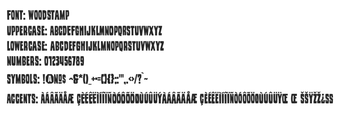
Woodstamp from Woodstamp is a decorative display font that reproduces the worn texture of woodblock printing for graphic headlines and logos. The font applies eroded edges and internal grain to each glyph so text reads as if stamped or block-printed. It ships in standard TrueType/OpenType formats and installs on Windows, making it suitable for designers, digital artists, and hobbyists seeking an authentic vintage typographic voice.
Woodstamp provides a literal stamped texture for display typography
Distressed, eroded character design is the font's defining trait: each glyph includes internal weathering and rough edges that simulate woodblock or rubber-stamp printing. The face uses bold, heavy-weight letterforms, which supports high visibility in large-format uses. The designer notes the font is optimized for display sizes, so visual grain and erosion are most apparent in headlines and artwork rather than body text.
Control targets headline styling rather than fine typographic tuning
The font offers a focused typographic scope: a single heavy display weight with standard uppercase and lowercase characters rather than multiple weights or variable axes. That makes it a specialist tool for posters, apparel design, logos, and social posts where a handcrafted look matters. Using it alongside a neutral sans or slab face preserves readability while keeping the stamped personality in focal copy.
Installation and cross-application use are straightforward on desktop
Files come in common formats and install like typical system fonts. Typical workflow steps include extracting the ZIP and installing the .ttf/.otf file by right-clicking and selecting Install, after which applications enumerate the face. Supported host applications include:
Microsoft Word and desktop publishing apps
Adobe Creative Cloud programs for vector and raster work
GIMP and other image editors that accept system fonts
Distribution and community reception favor creative projects and reuse
The font distributes through popular repositories and has a positive reception among designers for its consistent eroded styling across the character set. Compatibility with any system that accepts TrueType or OpenType files makes it portable between desktop environments. The specialized aesthetic reduces the need for manual distressing in design software, which users cite as a practical time saver in creative workflows.
Practical choice for designers needing an authentic stamped headline voice
Woodstamp is a focused choice for designers and hobbyists who want a literal, weathered typographic voice for headlines and branding. For web delivery, convert the file to web formats and embed the resulting WOFF/WOFF2 assets in project builds. Note that extended character coverage may be limited, so confirm glyph needs before committing to multilingual work.
Laws concerning the use of this software vary from country to country. We do not encourage or condone the use of this program if it is in violation of these laws. Softonic may receive a referral fee if you click or buy any of the products featured here.